The PumpStriker dashboard: your signals, on your own machine
The PumpStriker dashboard is a local web page that the Engine serves in your browser, on the same machine. It shows a Live Feed of signal cards, every signal with search and CSV export, the Engine's health, and ranked Hall of Fame and Winners lists from your own records. It is not a website you log into.
By Mezyan D, Bathyr Devs Last reviewed
- Live FeedLiveSignal cards, newest first
- SignalsLiveSearch, filters and CSV
- EngineLiveHealth and data sources
- Hall of FameLiveRanked past signals
- WinnersLiveSignals that reached 2x first
- WalletNeeds setupYour browser wallet signs
- Recover SOLNeeds setupClose empty token accounts
What are the key facts about the PumpStriker dashboard?
| Where it runs | In your browser, served by the Engine on your own machine at 127.0.0.1:1002Live |
|---|---|
| Access | Local by design: not a website you log into, and pumpstriker.fun never links to it or embeds it |
| Pages | Live Feed, Signals, Engine, Hall of Fame and WinnersLive |
| Exports | Any list as CSV, with each value's source and ageLive |
| Buy links | A Buy link opens your own Telegram bot on that token's cardLive |
| Wallet and Recover SOL | Off until you configure them; your own browser wallet signsNeeds setup |
- Live
- In the current build and on by default, or on when you turn it on.
- Needs setup
- Built, but off until you configure it.
What is on the local dashboard?
The Engine serves the dashboard in your browser on the same machine. These are its pages:
| Page | What it does |
|---|---|
| Live Feed Live | A live grid of signal cards, newest first, with live prices for tracked tokens and a Buy link that opens the bot on that token's card. |
| Signals Live | Every signal with search, grade and Telegram filters, paging and CSV download. |
| Engine Live | A health view: data sources, rules, integrity checks and running state. |
| Hall of Fame and Winners Live | Ranked lists of past signals, built from your own Engine's records. |
| CSV exports Live | Any list as CSV, with each value's source and age. |
| Wallet Needs setup | Connect your own browser wallet (Sign-In With Solana) to see balances and positions and to buy or sell. The bot prepares unsigned transactions, and only your wallet signs. |
| Recover SOL Needs setup | Close empty token accounts and unwrap wSOL for free, signed in your wallet, plus an optional UnclaimedSol estimate. |
Why does the dashboard run only on your machine?
Because PumpStriker is self-hosted. The Engine serves the dashboard at 127.0.0.1:1002, an address that only the same computer can open. It is not a website you log into, and pumpstriker.fun never links to your dashboard, proxies it or embeds it.
Keep it local on your side too: never expose ports 1002 or 3748 to the internet. The security page lists everything else you should secure on the machine that runs PumpStriker.
What do the Hall of Fame and Winners pages show?
Both pages rank past signals from your own Engine's records. The Engine re-reads each decision about 6 and 24 hours later (grade A and B signals also after about 1 hour), so the rules can be reviewed. Every signal stays on the record, and the Signals page lists them all.
- Winner: a signal that reached 2x first. Within 24 hours, a candle closed at 2x the signal price before any candle closed at 0.65x.
- Peak: the highest candle close after the signal, as a multiple of the signal price.
Selected examples from our own records, with the time the Engine detected each one, are on the Hall of Fame page of this site.
Real screenshots
Two pages of the local dashboard, exactly as captured. Times on the screenshots are the capturing computer's local time (UTC+1).
As of
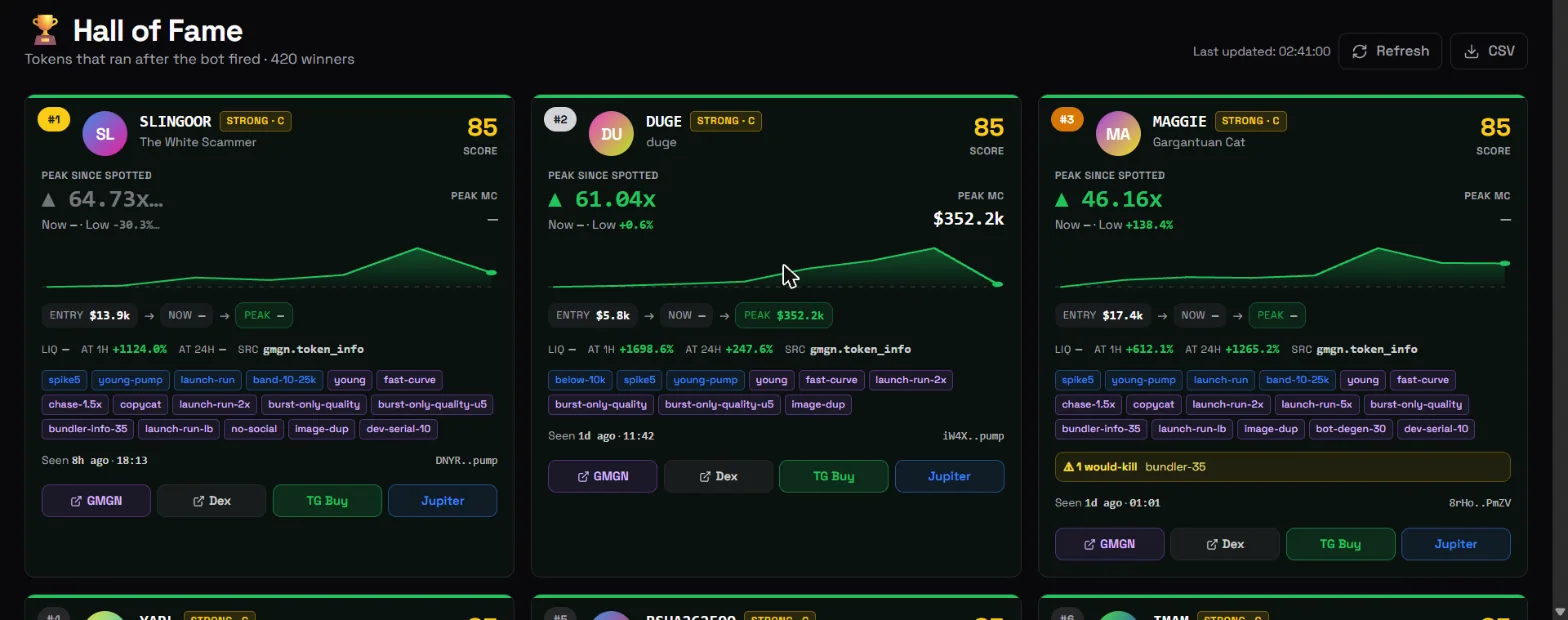 Hall of Fame pageOpen full size: Hall of Fame page screenshot, opens in a new tab
Real screenshots of the PumpStriker dashboard, taken on 9 November 2026. A grey card is still provisional: its 24-hour window had not closed yet. "Peak PnL" is a sort option that ranks cards by their peak; it is not a profit figure. Buttons such as "TG Buy" are dashboard links and do not mean a token was alerted or bought.
Selected examples from PumpStriker's signal records. A peak is the highest closing price within 24 hours after the signal, not a trading result. Past performance does not guarantee future results. Not financial advice.
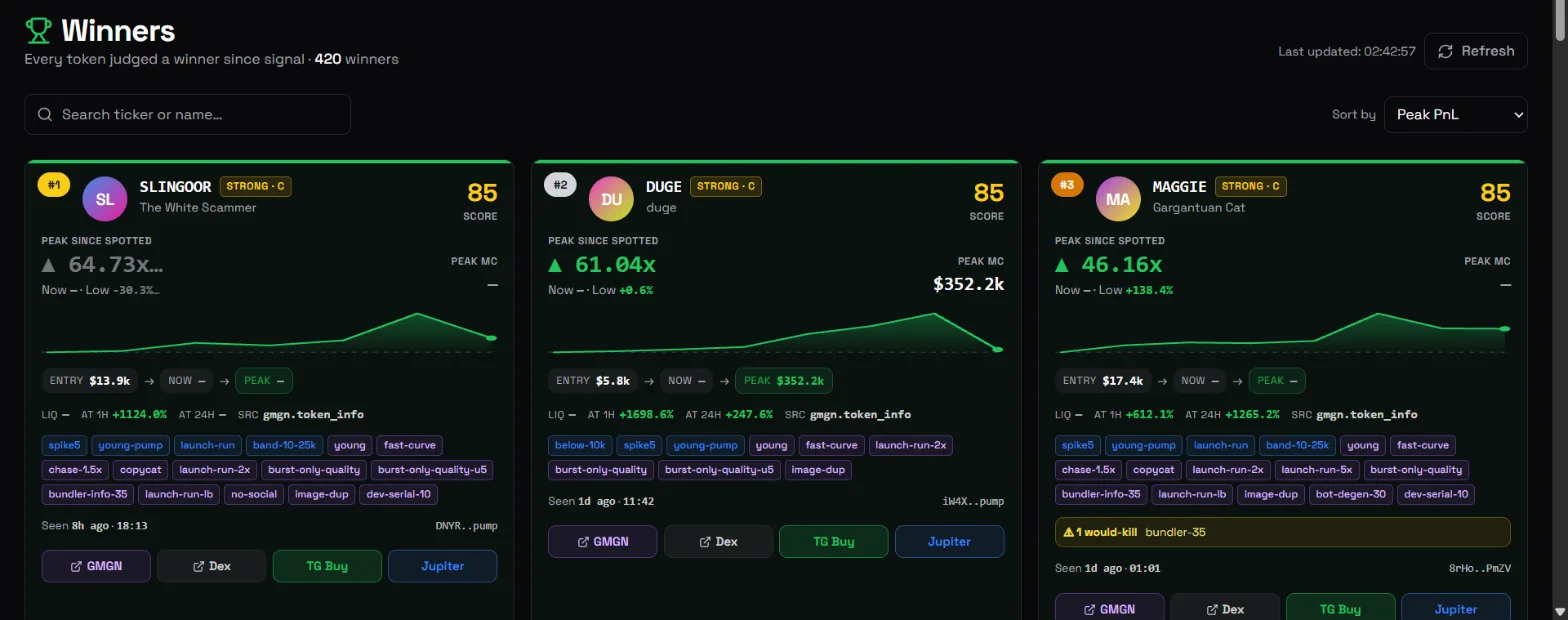
Real screenshots of the PumpStriker dashboard, taken on 9 November 2026. A grey card is still provisional: its 24-hour window had not closed yet. "Peak PnL" is a sort option that ranks cards by their peak; it is not a profit figure. Buttons such as "TG Buy" are dashboard links and do not mean a token was alerted or bought.
Selected examples from PumpStriker's signal records. A peak is the highest closing price within 24 hours after the signal, not a trading result. Past performance does not guarantee future results. Not financial advice.
How do I know the Engine is healthy?
The Engine page shows its data sources, rules, integrity checks and running state. Alarms such as a GMGN ban, a dark feed, an integrity failure or a broken link to the bot also reach your Telegram, once when raised and once when cleared. When the Engine's GMGN budget is tight, it reads data less often, and it remembers rate-limit bans across restarts.
What do the Wallet and Recover SOL pages do?
Both pages need setup and stay off until you configure them. On the Wallet page you connect your own browser wallet with Sign-In With Solana to see balances and positions and to buy or sell: the bot prepares unsigned transactions, and only your wallet signs. The Recover SOL page closes empty token accounts and unwraps wSOL for free, signed in your wallet, with an optional estimate from UnclaimedSol, a partner of Bathyr Devs.
Frequently asked questions
Is the PumpStriker dashboard a website I log into?
No. The Engine serves the dashboard in your browser on the same machine, at 127.0.0.1:1002. It is not a website you log into, and pumpstriker.fun never links to it or embeds it.
Can I export my signals?
Yes. The Signals page has a CSV download, and any list can be exported as CSV with each value's source and age. Every signal stays on the record.
What do the Hall of Fame and Winners pages show?
Ranked lists of past signals, built from your own Engine's records. A winner reached 2x first: within 24 hours, a candle closed at 2x the signal price before any candle closed at 0.65x. Selected examples from our own records are on the Hall of Fame page of this site.
Do trades from the dashboard's Wallet page get automatic exits?
No. Trades made from your browser wallet on the dashboard are not watched by the bot's exit engine, so they get no automatic stop-loss or rug exit. Buying a pasted address there also shows a warning that no token flags were checked.
Sources and review
Risks and disclosures
- High risk: Memecoins are extremely high-risk and can move very fast in either direction. Only trade with money you can afford to put at risk.
- No guarantees: PumpStriker does not promise profit, a win rate or any trading result. A signal or grade is information, not a prediction, and no tool can make an outcome certain. Anything promising guaranteed returns is a scam.
- Self-custody: You run PumpStriker on your own computer or VPS and hold your own keys. Bathyr Devs never holds or moves your funds and never asks for your seed phrase; the software trades only from your own wallet, when you tap or within the auto-buy and exit rules you switch on. Importing a wallet means pasting its key into your private Telegram chat once (the bot deletes it at once), and Generate New shows a new key once in that chat, so use a dedicated trading wallet. On-chain transactions are final; we cannot reverse them or recover keys, so keep your machine, Telegram account, bot token and
.envfile secure. - Third parties and partners: PumpStriker relies on services run by others (GMGN, Helius, Jupiter, pump.fun, Telegram), and their uptime, fees and terms apply. UnclaimedSol is a partner: rent-recovery claims made through the in-bot button may earn Bathyr Devs a referral share.
- No token: There is no PumpStriker or BATHYR token, presale or airdrop. Anyone selling one is running a scam.
Not financial advice: PumpStriker is software, not financial advice. Nothing on this site is a recommendation to buy or sell any token. Do your own research (DYOR). Read the risk disclaimer and the terms of use.